


The Curse of the “Zombie Server”
Every month, thousands of cloud environments sit idle, running up costs while nobody uses them. We call them “zombie servers.”
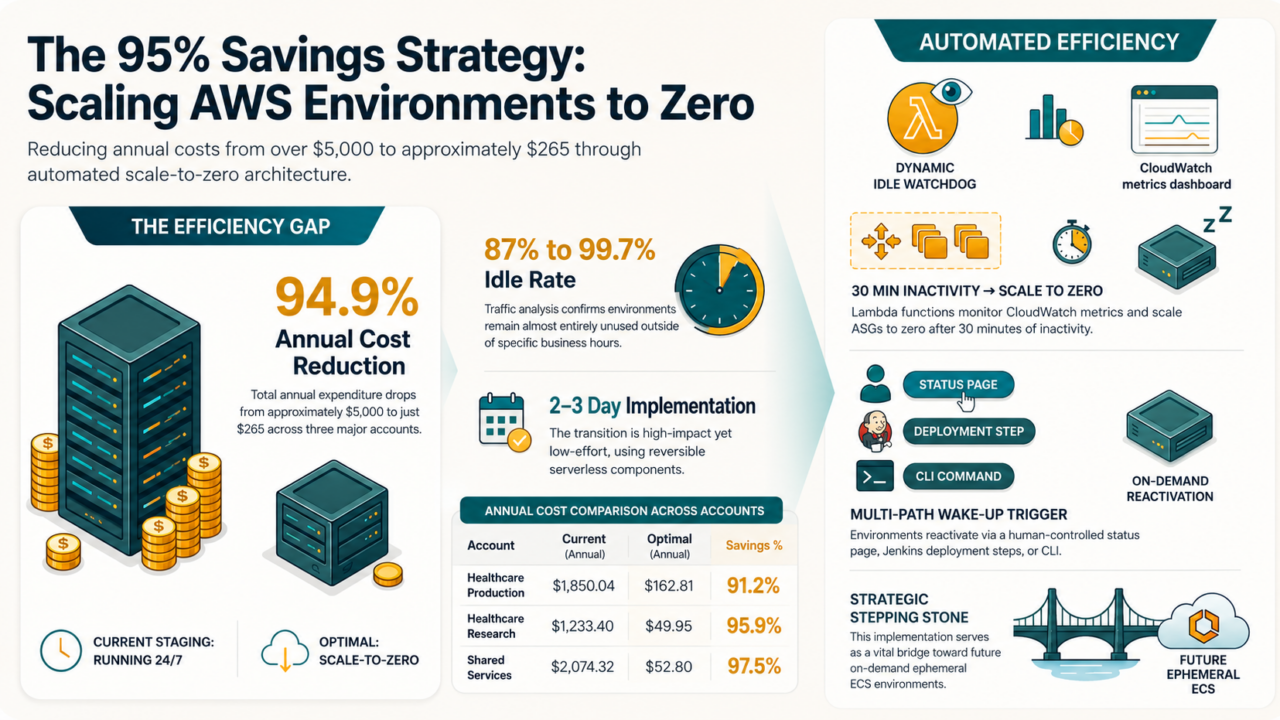
In one 30-day audit, our staging environments were idle between 87% and 99.7% of the time. One received zero traffic from midnight to noon UTC every single day. So we turned them off.
The result: non-production cloud spend dropped by nearly 95%.
From a FinOps perspective, this was more than wasted spend, it was a failure in infrastructure unit economics. At RIVA, we addressed it by implementing a scale-to-zero strategy across several environments, reducing non-production cloud spend without slowing down development teams.
The audit data told a clear story, but the more interesting finding was why common infrastructure metrics had hidden the problem for so long.
This post is written for engineering and infrastructure leaders making decisions about cloud spend, but the strategic implications apply well beyond the tech team.
Idle infrastructure is still infrastructure you’re paying for.
Why Common Infrastructure Metrics Are Misleading
One of the biggest challenges in automating scale-down is identifying the right signal for “real usage.” At first glance, metrics like CPU usage and network traffic seemed like obvious choices. In practice, they made these environments look active even when nobody was using them.
We found two main reasons for this:
- Background Operating System Activity
Even idle servers still perform background tasks, health checks, and operating system maintenance.
- Shared Servers Between Environments
Some staging and production workloads shared the same underlying infrastructure. Because of this, instance-level network metrics could not reliably distinguish staging traffic from unrelated production traffic.
The only reliable signal is actual web request traffic.
In AWS, we measured this using the Application Load Balancer (ALB) RequestCount metric. Unlike CPU or network metrics, RequestCount gave us an almost zero-false-positive signal for real environment usage.
We found this approach worked well because it:
- Ignored internal health checks and background activity
- Reflected real human or automated test traffic
- Allowed us to measure each environment independently at the target-group level
By setting a threshold of 30 consecutive minutes with zero requests, we could confidently trigger an automated scale-down.
Leveraging a Simple Manual Startup Process
When designing the server wake-up process, we initially tried to fully automate environment startup whenever new traffic appeared. Our first design explored using ALB listener rules to redirect traffic to a lightweight Lambda-based startup handler whenever an environment was offline. In theory, the approach sounded elegant. In practice, it became fragile very quickly.
We discovered AWS load balancers do not gracefully fail over to Lambda target groups when an Auto Scaling Group is completely empty. Instead, requests simply returned HTTP 503 errors. Attempting to automate listener-rule swapping introduced timing-related failures, race conditions, and operational complexity that outweighed the benefits. We ultimately decided the added complexity was not worth it.
Instead, we chose a simpler, human-in-the-loop approach that proved far more reliable operationally: developers intentionally start environments when needed. We designed the wake-up handler to be idempotent—safe to run repeatedly without causing side effects. If an environment was already online, the startup request simply did nothing.
To keep the dashboard responsive without overwhelming CloudWatch APIs, we added a lightweight optimization layer: a watchdog process periodically cached environment state in AWS Systems Manager Parameter Store so the UI could load instantly without excessive monitoring queries.
Scale-up is now triggered in three simple ways:
- A dashboard with a “Wake Up” button
- A Jenkins pre-deployment step
- A manual command-line option for engineers
One Tradeoff: Startup Time
While the wake-up request itself is nearly instant, fully starting an environment still takes time because servers, applications, initialization scripts, and target-group health checks all need to complete successfully. In practice, startup typically takes between 5 and 8 minutes. To account for this cold-start window, we adjusted Jenkins deployment timeouts to avoid false failures during startup.
A 5–8 minute startup window is real, and we won’t minimize it. For teams accustomed to always-on environments, that’s a behavioral shift. What we found in practice: developers adapted quickly once they understood the model. Starting an environment became an intentional act rather than an assumption, and that intentionality turned out to be a feature, not a bug. Engineers stopped leaving environments running “just in case.” Startup time became a non-issue within the first few weeks.
Gaining Operational Flexibility
Saving nearly $4,900 annually across a small number of accounts was a meaningful result, but the long-term strategic value was even more important. This project became a stepping stone toward a broader goal: fully on-demand, ephemeral development environments powered by containers and ECS. By proving that teams could successfully operate in a scale-to-zero model, we opened the door to a more flexible architecture where every pull request can create its own isolated environment on demand.
That shift creates benefits far beyond cost reduction:
- No more waiting for shared staging environments
- Multiple QA efforts can run in parallel
- Developers can test features in isolated environments
- Temporary environments can automatically shut down after use
- Teams get faster feedback and release cycles
The cost savings matter, but operational flexibility matters more.
The Future of Quiet, On-demand Infrastructure
Moving from always-on infrastructure to a more event-driven, on-demand model changes how teams think about cloud operations. By rejecting overly complex automation in favor of a simple and intentional startup process, we reclaimed nearly 95% of our non-production spend while building a system that was easier to maintain and easier for developers to trust.
We are no longer managing servers; we are managing utility.
As more organizations move toward quieter, on-demand infrastructure, the opportunity extends far beyond cost reduction.
If your team is still running staging environments around the clock, the cost is probably the least of your problems. The real issue is that you’re carrying infrastructure complexity you don’t need. Start with a usage audit—30 days of ALB request data will tell you everything.
Reach out to solutions@rivasolutionsinc.com if you want to talk through what a scale-to-zero model could look like in your environment.
Related Articles